
Apple Intelligence in China: A Practical Guide to iOS 27.3's First AI Features, Eligibility Checks and Setup Pitfalls
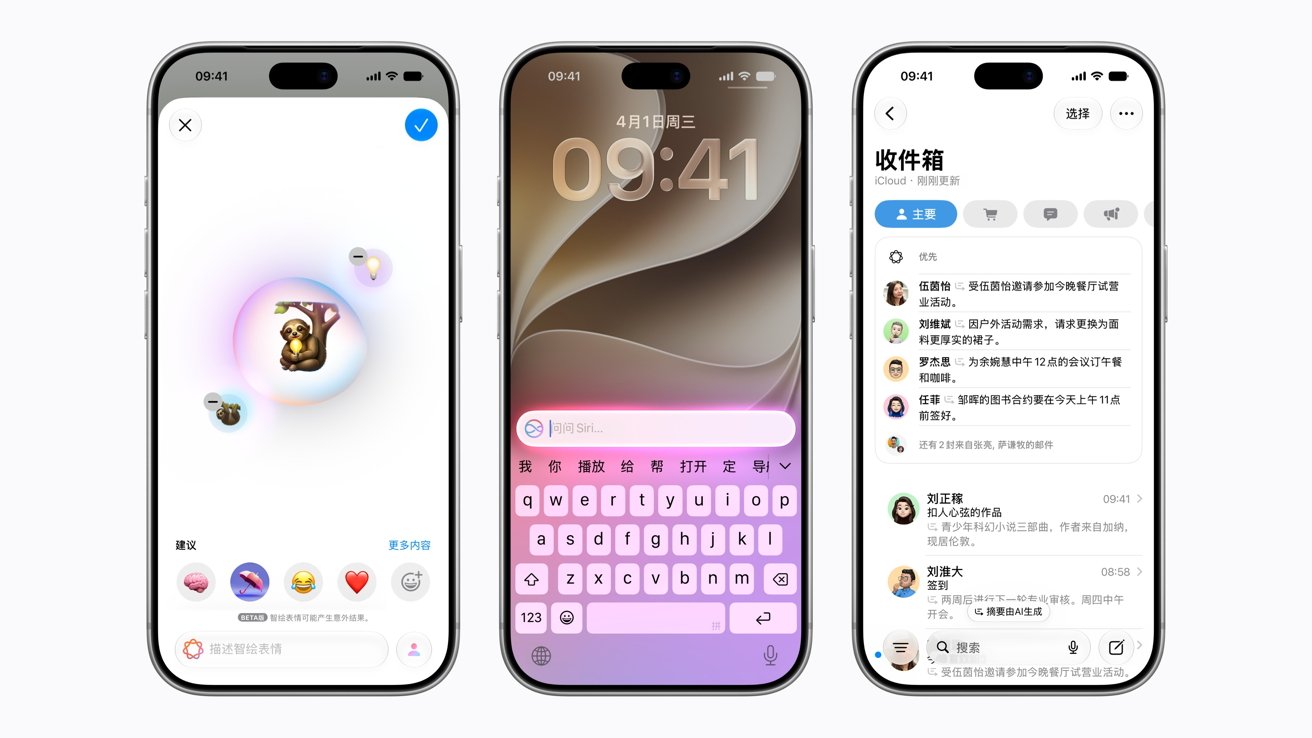
Two years after Apple Intelligence first appeared on iPhones in the US in 2024, the system is finally switching on in the China region — and the single most useful thing to know before you open Settings is that this is not the full experience described in launch keynotes. Apple's arrival, delivered through the iOS 27.3 developer beta, opens a clearly bounded slice of the platform: Clean Up in the Photos app, Visual Intelligence, writing tools, notification and email summaries, Smart Reply in Messages, smart emoji generation, plus audio transcription in Notes and call transcription with summaries in Phone. Missing from the package is the AI Siri that Apple has been rolling out gradually in other countries and regions in 2026.
That gap between headline and reality is where most readers waste an afternoon. The practical questions are narrower and more concrete: does my hardware qualify, which settings silently hide features, should I install a pre-release build on my daily phone, and what do I gain by waiting for iOS 27.3 this December? Below is the walkthrough I would run myself, in order, with the checks that trip people up flagged at each step.
Check 1: Verify your hardware before you touch anything else
Apple's China newsroom published a compatibility list with the announcement, and it is stricter than many "any recent iPhone" summaries suggest. The supported handsets are iPhone 15 Pro, iPhone 15 Pro Max, the iPhone 16 family and all later models, plus iPhone Air and iPhone Duo. The plain iPhone 15 and iPhone 15 Plus are not on that list, which means upgrading to iOS 27.3 will not unlock Apple Intelligence on those devices at all — the constraint is silicon and memory, not software version.
The second boundary matters just as much for planning: this first wave is iPhone-only. Apple Intelligence for Mac and iPad in the China region waits on the local approvals the company has to obtain before shipping, so refreshing the Software Update pane on a MacBook or an iPad Pro will not change anything in the near term.
| What you own | Status in this rollout | What to do |
|---|---|---|
| iPhone 15 Pro / 15 Pro Max | Eligible | Proceed to the settings checks |
| iPhone 16 series and later, iPhone Air, iPhone Duo | Eligible | Proceed to the settings checks |
| iPhone 15, iPhone 15 Plus | Not listed as supported | Don't install a beta hoping for access |
| Mac, iPad in the China region | Not part of this release; pending approvals | Wait for a later announcement |
| AirPods for Live Translation | Only certain models and current firmware | Update earbuds before pairing |
Check 2: Fix the three settings that hide features without warning
Eligible hardware is necessary but not sufficient. Apple's own notes on the China release set two language conditions that are easy to miss: both the iPhone system language and the Siri language need to be set to English or Simplified Chinese. If either one sits in another language, features disappear from the interface rather than showing an error, which is why so many first-day reports read like "it doesn't work" when the real problem is a language mismatch.
The second condition is account and location scope. Coverage of the announcement by Chinese financial media, including 10jqka.com.cn, relayed Alibaba's explanation that the Tongyi Qianwen-powered service is limited to users who bought a supported iPhone in mainland China, or whose device location and Apple Account region are both set to mainland China. If you migrated your Apple Account to another region years ago, that history can keep you out of the first wave even on a qualifying handset.
The third condition is accessory-specific. The Live Translation experience that runs through AirPods requires the right earbuds, the latest firmware, and pairing with an iPhone where Apple Intelligence is already active — Apple's support documentation describes the flow as selecting your AirPods in Settings and enabling Live Translation there. On the China rollout, the companion features reported at launch include live translation across Messages, FaceTime, Phone and AirPods.
Step 3: Pick your route — beta now, or wait for the December release
There are only two honest paths. The fast path goes through the developer channel; the safe path waits for the public release.
- Back up first. Make a current iCloud or computer backup before any pre-release install. Beta builds are the most common cause of avoidable rollback headaches.
- Enrol the device. Developer builds come through developer.apple.com; the free public channel runs through beta.apple.com with an Apple Account.
- Install. On the iPhone, open Settings, then General, then Software Update, then Beta Updates, and choose the beta you enrolled for — the sequence Apple documents for installing pre-release software.
- Set languages. Switch iPhone language and Siri language to English or Simplified Chinese, restart, and confirm Apple Intelligence appears in Settings.
- Test one feature per day. Start with Clean Up on a photo you don't mind experimenting on, then writing tools in Notes, then Smart Reply in Messages. Feature-by-feature testing makes it obvious which capability is failing if something is greyed out.
Timing supports the cautious choice. Apple confirmed on October 31 that the first core features enter testing with the developer build on November 4 (which lands November 3 in the US because of time zones), with the full public rollout scheduled for iOS 27.3 this December — and, notably, with no fixed date announced for that December release.
| Route | You gain | You accept |
|---|---|---|
| iOS 27.3 developer beta | Early hands-on with Clean Up, Visual Intelligence, writing tools and Smart Reply | Instability, battery drift, possible rollback, feedback-cycle bugs |
| iOS 27.3 this December | Signed, approved build with a wider feature set already vetted | Waiting weeks; day-one server load and slow settings propagation |
Step 4: Know what each first-wave feature is actually good at
- Clean Up — remove unwanted objects from a photo while the rest of the frame is preserved. Best for travel shots with crowds and accidental passers-by.
- Visual Intelligence — point the iPhone camera at something and get recognition and analysis. Practical for objects, text and scenes you can't name.
- Writing tools — proofread, rewrite and summarise selected text anywhere you can highlight it; the workhorse for emails and long messages.
- Smart Reply — context-aware suggested replies inside Messages; useful for short confirmations, not for nuance.
- Notification and email summaries — collapses noisy inboxes and stacks of alerts into the parts that matter.
- Notes transcription and Phone call summaries — meetings and calls captured in text; check local consent norms before recording other people.
- Smart emoji generation — the personal-expression layer of the first batch.
Two things people assume are included but are not: the AI Siri, and the next-generation capabilities Apple announced at WWDC 2026. The master plan stays as Apple described it — the models running today are generative AI models Apple built itself, while the work with Alibaba is aimed at folding Qianwen capability into Siri over time.
Common misconceptions worth correcting early
- "Updating iOS is enough." No. Language settings, account region and hardware generation all gate access.
- "This is the same Apple Intelligence from the US launch." It is closer to that platform's early international version — a subset, not the current global feature set.
- "If it's missing, something is broken." More often the feature simply isn't in this release: the AI Siri and other next-generation items are explicitly excluded from the China beta.
- "Beta means beta for everything." Compliance-approved features arrive in a defined order; iPad and Mac in the China region remain pending.
FAQ
When can I actually use the features?
Testing opens with the iOS 27.3 developer beta from November 4, and the complete first wave arrives with iOS 27.3 this December. Apple has not published a specific December date.
Does my standard iPhone 15 work?
No. The published support list starts at iPhone 15 Pro, and includes iPhone 16 and later models plus iPhone Air and iPhone Duo.
Will Siri talk to me in Chinese with AI features?
Not in this release. The AI Siri is excluded, and it is scheduled to reach other countries and regions gradually in 2026 before appearing in the China build.
Is my data processed on device?
Apple says the current system runs on generative AI models it built itself, and that meeting China's regulatory requirements involved working with a local partner — Alibaba — with plans to integrate Qianwen capability into Siri.
Should a non-technical user install the beta?
No. If this is your only phone, wait for the December release of iOS 27.3 and install the public build.
Your action plan for the next seven days
- Open Settings and confirm your exact iPhone model against the support list.
- Set iPhone language and Siri language to English or Simplified Chinese and restart.
- Check your Apple Account region and device location if you ever migrated regions.
- Update firmware on any AirPods you plan to use for Live Translation.
- Make a full backup, then decide explicitly: developer beta now, or iOS 27.3 this December.
- If you choose the beta, test Clean Up, writing tools and Smart Reply on non-critical content for three days before relying on anything.
Written by Sarah Chen, Tech Daily. Spotted a setup issue we should cover in a follow-up? Send it to hello@techdaily.com and we'll test it on MyTechDailyNews.