
How Fast Should You Patch Windows? MyTechDailyNews Weighs the Options After Microsoft's Record October Update
Microsoft fixed 1413 CVEs across its products in its October 2026 security update, and 1102 of them sit in Windows alone. Its own warning is sharper than the number: with AI tooling, an attacker may need only a few hours to read a published patch and build an exploit. So the question for anyone who uses a PC is no longer how many bugs were fixed but how quickly the fix reaches the machine.
That reframing is what makes this release worth a closer look. The October update continues the steep climb in disclosed flaws seen through the second half of 2026, and it collides with a habit many readers still have: pause the update, wait for other people to find the bugs, install over the weekend. Below, MyTechDailyNews compares the realistic options for home users, small teams and corporate IT — the trade-offs, the verification steps, and the scenarios where each route actually makes sense. By Sarah Chen, Tech Daily.
What did Microsoft actually ship this month?
Conclusion first: the volume is historic, and the growth is concentrated in Windows. Microsoft's October 2026 security update guide lists 1413 CVEs fixed across the company's products, with 1102 of them in the Windows platform itself — a figure far above a normal month and the latest step in the disclosure surge running through the second half of 2026.
| Month | Windows vulnerabilities fixed |
|---|---|
| July 2026 | 413 |
| August 2026 | 233 |
| September 2026 | 726 |
| October 2026 | 1123 |
| October 2025 | 134 |
The year-on-year line is the loudest signal in that table: the same month produced 134 Windows fixes in 2025 and 1123 in 2026.
A detail most headlines skip, and the one you can act on today: this release is identifiable by knowledge-base number, so you can confirm what your device received. Microsoft's servicing entry for the October 13, 2026 update lists KB5127648 for Windows 11 versions 24H2, 25H2 and 26H2 (OS builds 26300.9711 and 26200.9711) and KB5127646 for version 26H1 (build 28000.3231), alongside KB5127647, which improves the reliability of the update installation process. If those identifiers appear under Settings, Windows Update, Update history, the October fixes are on your machine.
One caveat we would flag as our own analysis rather than vendor fact: the year-on-year jump is not a perfectly clean comparison. Windows 10 reached end of support on October 14, 2025, which pushed devices either onto Windows 11 or into the Extended Security Updates channel for version 22H2. A reshuffled installed base changes what gets serviced, how widely fixes are validated, and how findings get reported.
Does a record bug count mean Windows became less safe?
Short answer: Microsoft says no, and argues that counting bugs is now a misleading scorecard. In the past, flaws could hide for years inside a huge codebase until an external researcher reported one or an attacker started using it. Today Microsoft runs AI systems that scan far more code and hunt defects on its own initiative, so the number of discoveries and disclosures rises by design.
Nuno Costa, who leads the Windows Servicing and Delivery team at Microsoft, puts the point plainly: the volume of vulnerabilities does not fully describe how secure an operating system is. The decisive variables are whether flaws are found in time, fixed, and whether that protection actually reaches user devices.
The engine behind the increase is MDASH, the AI security scanning effort Microsoft is using at scale. It combines Microsoft's own security models with partner technology including Anthropic Mythos, and works through purpose-built AI agents that look for and verify candidate vulnerabilities.
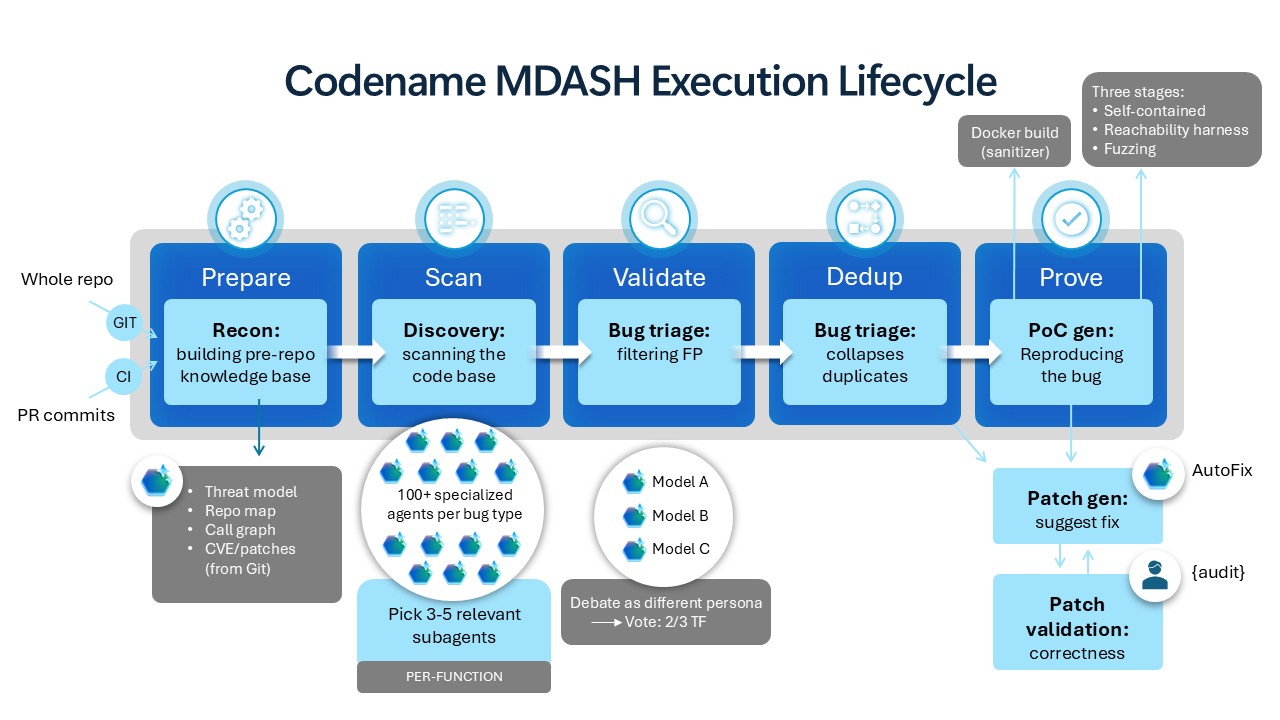
Beyond spotting odd code, the system helps engineers decide which Windows versions are affected, what a flaw can actually do, and which remediation fits. Microsoft is careful about the limits: AI has not replaced security engineers, and the final judgement on a vulnerability and its fix still sits with humans. Publishing details is framed as risk reduction rather than risk creation, because researchers and IT staff can then scope severity and choose targeted defenses instead of guessing.
How the patch gap shrank from weeks to hours
Conclusion: the dangerous interval is the time between Microsoft publishing a fix and your device installing it — and AI has compressed it. Attackers can let a model diff the code before and after a patch, see what changed, and reverse-engineer the trigger condition. Work that once meant spending days or even weeks reading software internals can now be done in hours, which is why the industry term "patch gap" matters more than the raw CVE count.
This is the double-edged half of the story. The same technology that helps defenders find flaws earlier also helps attackers locate unfixed defects and dissect released patches. A device that has not installed the update is not automatically safe the moment Microsoft ships one.
Two concrete items in this cycle show why prioritisation matters. One Windows Shell security feature bypass flaw, tracked as CVE-2026-96951, was already found being exploited. Separately, one .NET Framework security feature bypass vulnerability was publicly disclosed.
An independent benchmark supports Microsoft's sense of urgency: under CISA's binding operational directive BOD 26-04, US federal agencies must remediate the highest-risk vulnerabilities that are publicly reachable and already known to be exploited within three days, with the directive's timelines spanning 3 to 60 days by risk tier. Policy has moved to a three-day clock for the worst cases, which is roughly the window Microsoft's own guidance now describes as acceptable.
Where enterprise deployment actually stands
Conclusion: fixes ship faster than they land. Jeremy Chapman, the director in the Microsoft 365 department who works with Windows customers, has warned that enterprises should stop treating monthly updates as something that can slide by three days or longer. If a critical update is deployed weeks after release, an attacker who can analyse vulnerabilities with AI has been handed enough time to work.
Microsoft's own device diagnostics show the gap is real: in the sample measured in August 2026, less than half of enterprise devices had installed a security update two weeks after release, and about a quarter still had not installed it after four weeks. Secondary industry reporting points the same way, with Verizon's 2026 Data Breach Investigations Report cited by several security outlets as putting the median full-remediation time for flaws listed in CISA's known-exploited catalog at 43 days; different datasets disagree on the exact figure, so treat it as directional rather than precise.
Microsoft's ask is a change of posture: stop treating security updates as routine maintenance that can creep along a fixed calendar, and start measuring the delay between a fix being available and it being live on the device. Risk priority beats volume: internet-facing machines, identity infrastructure and systems holding valuable data go first.
Which patching route fits you: a side-by-side comparison
The honest answer is that the right delay depends on who you are and what breaks if a machine reboots at the wrong minute.
| Reader type | Default behaviour | What we would recommend after this month's update | Main trade-off |
|---|---|---|---|
| Home user on Windows 11 | Automatic monthly install | Let it run; confirm the KB number in Update history and reboot once | Loses almost nothing; a reboot you schedule beats one you miss |
| Home user who pauses updates | Paused for a week or a month | Resume now, since one exploited Windows Shell flaw is in this batch | Waiting for early-bug reports once made sense; with a hours-long patch gap it buys less protection than it costs |
| Small business, a handful of PCs, no IT staff | Consumer Windows Update | Keep automatic installs, add one fixed reboot window, and patch the machine that runs email and line-of-business logins first | Minimal control, minimal overhead |
| IT team using Windows Update for Business rings | Quality updates deferred by days or weeks (deferral can run up to 30 days) | Compress to the short pilot pattern Microsoft documents: day-0 pilot, one-day fast ring, two-day broad ring, and stop deferring security fixes by the old three-days-or-more habit | Compatibility testing versus exposure; the short ring pattern keeps both |
| Enterprise on Windows Autopatch | Microsoft-managed rollout, restart-free hotpatching on Windows 11 enabled by default | Use it as the fast lane for internet-facing and identity systems | Less granular control, faster closure of the gap |
| Enterprise still on WSUS or Configuration Manager | Customer-managed approval and distribution | Keep for devices that genuinely need gatekeeping; note the standalone WSUS role is deprecated but supported until 2034 | Maximum control, but approval queues are where the weeks disappear |
| Device still on Windows 10 22H2 under ESU | Security-only fixes | Plan the migration decision now, since servicing depth and scope are narrower than on Windows 11 | Familiar hardware versus shrinking support surface |
Verdict in one line: when the bottleneck is decision-making rather than bandwidth, cloud-managed routes close the gap in days; locally gated routes buy control at the price of days.
Common misconceptions worth clearing up
- "More CVEs means Windows is worse." Microsoft's position is that AI-assisted scanning, including MDASH with partner models such as Anthropic Mythos, surfaced defects that would previously have stayed hidden.
- "Patch Tuesday is the finish line." It is the start of the clock: until your device installs the update, the flaw is still live on that machine.
- "Critical rating only, ignore the rest." This month's actively exploited item, CVE-2026-96951, is a security feature bypass in Windows Shell, not a headline-critical remote code execution bug.
- "Waiting four weeks is risk-free caution." Microsoft's August 2026 diagnostics show about a quarter of enterprise devices still unpatched after four weeks, which is precisely the exposure window the company is asking customers to stop creating.
- "Home users can ignore all this." If a device is directly reachable from the internet, runs a remote desktop service or holds the family's financial accounts, it belongs at the front of the queue.
Action checklist for the next three days
- Open Settings, then Windows Update, and check whether updates are paused. If they are, resume and install.
- After the install, confirm the update in Update history — KB5127648 for Windows 11 24H2, 25H2 and 26H2, KB5127646 for 26H1.
- Reboot fully rather than leaving the device in sleep; several security fixes only complete on a clean restart.
- Order your devices by exposure: anything reachable from the internet, then machines used for banking and work logins, then everything else.
- For small teams, write down which machine runs authentication, backup or accounting software and patch it first, twice a month at minimum.
- For IT, replace "we patched" reporting with "median hours from release to install" per device group, and shorten deferral rings for security updates.
- If any PC is still on Windows 10 22H2 under ESU, schedule the upgrade or replacement decision this quarter instead of next year.
FAQ: what readers keep asking
Is Windows 11 less safe in October 2026 than it was last year?
Not on the evidence Microsoft presents. The October 2026 numbers (1123 Windows fixes against 134 in October 2025) track a deliberate expansion of AI-assisted code scanning, not a sudden collapse in code quality. The part that genuinely worsened for everyone is timing: attackers now have only hours, not weeks, between a published fix and a working exploit.
Should I wait a week before installing, in case the update is buggy?
For a home PC, waiting now buys less safety than it used to. A short, staged approach beats a long freeze: install on one device first, confirm the KB entry and the reboot, then let the rest follow within days. For managed fleets, the day-0 pilot plus one- and two-day rings keeps testing in the loop without opening the patch gap.
What is the patch gap, in plain terms?
It is the period when a vulnerability is publicly described and fixed by the vendor but still uninstalled on real devices. Think of it as a broken lock with the replacement lock already sitting in the hallway.
Does this mean my antivirus app is enough?
No. Feature-bypass flaws such as CVE-2026-96951 in Windows Shell work by making the system distrust the wrong signal, which is a servicing problem, not a scanning problem. Keeping the operating system current is the specific remedy.
How urgent is this for someone with a laptop and a phone?
Install the monthly update when it appears, restart when asked, and do not leave updates paused indefinitely. If your laptop is also the device where you approve bank transfers or open work email, treat it like a small business endpoint.
Bottom line
The story of the October 2026 update is not the count of 1413 CVEs, or even the 1102 that landed in Windows. It is that the interval between "fixed by the vendor" and "exploitable on your machine" has collapsed to hours, while devices in the field still lag by weeks. Security today is measured less by how many defects a manufacturer can surface than by how fast a correction travels from a bulletin to the keyboard in front of you. For readers, that makes one habit non-negotiable: install, restart, and check the KB number. For organisations, it makes the delay itself a metric worth managing.
Spotted an error in this piece, or want to share a patching story? Reach the Tech Daily news desk at hello@techdaily.com.
Reference sources
- Microsoft servicing entry, October 13, 2026 cumulative updates for Windows 11: https://support.microsoft.com/en-us/servicing/os/windows-11/2026/10/kb5127648-windows-11-24h2-25h2-26h2-security-update
- CISA, Binding Operational Directive 26-04 implementation guidance on prioritising security updates by risk: https://www.cisa.gov/news-events/directives/bod-26-04-implementation-guidance-prioritizing-security-updates-based-risk
- Microsoft, "Evolving Windows vulnerability management to meet the speed of AI-powered discovery", Windows Experience Blog, July 9, 2026: https://blogs.windows.com/windowsexperience/2026/07/09/evolving-windows-vulnerability-management-to-meet-the-speed-of-ai-powered-discovery/
- Microsoft Learn, MDASH (codename) agentic code scanning overview: https://learn.microsoft.com/en-us/security-exposure-management/ai-code-security-overview
- Microsoft Learn, Windows update management comparison for cloud PCs (Autopatch, Configuration Manager and WSUS): https://learn.microsoft.com/en-us/windows-365/enterprise/windows-365-deployment-guidance-updates
- Microsoft Learn, Windows Update for Business ring configuration and deferral values: https://learn.microsoft.com/en-us/compliance/anz/e8-patch-os
- Microsoft, Windows 10 Extended Security Updates (end of support October 14, 2025): https://www.microsoft.com/en-us/windows/extended-security-updates