
MyTechDailyNews Consumer Electronics Guide: What Targus DOCK402TT Means for Laptop Buyers
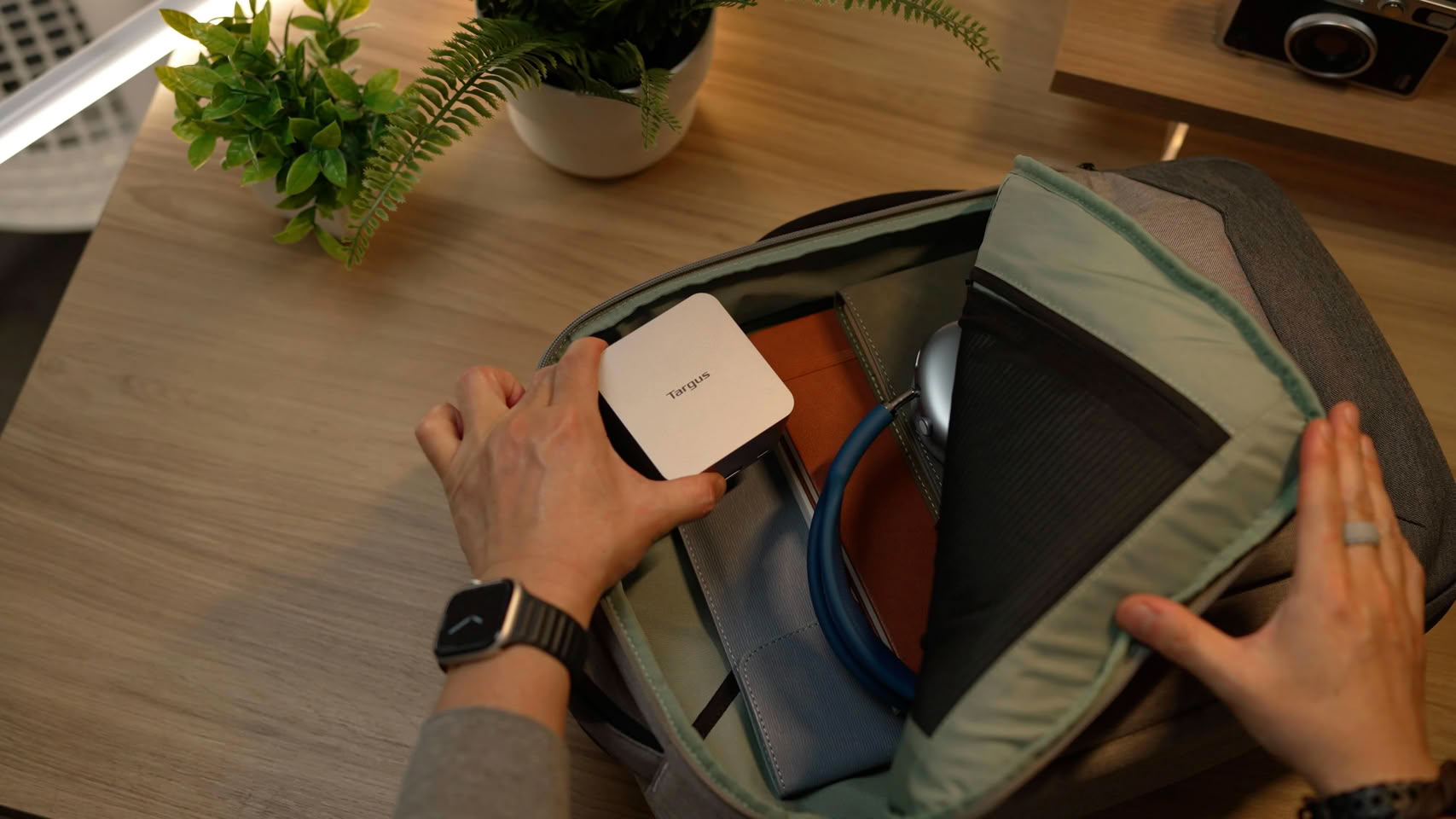
MyTechDailyNews focuses on practical buying decisions for consumer electronics, and this guide to the Targus DOCK402TT is built around the questions that matter at checkout: does it reduce the number of items in a laptop bag, can it replace a separate charger, and does it provide enough display, network and peripheral connectivity for common desk use? The product integrates a USB-C dock with a GaN charger in one unit, aimed at travel, hybrid work and temporary meeting setups. Once connected to wall power, a user can connect a laptop with one USB-C cable and access an external display, wired networking and peripherals without carrying a separate power adapter and docking device.
Core Value for Everyday Setups
The main value proposition is consolidation. Instead of plugging in one cable for data and video and another for charging, DOCK402TT is designed so that wall-powered use lets one USB-C cable serve multiple purposes: external display output, USB connections and wired Ethernet. For travel, the integrated approach may simplify packing; for temporary meeting rooms or shared desks, it means fewer accessories to set up. The dock does not claim to add display capability independently; the host laptop still needs a USB-C port capable of video output. That distinction is important for consumers choosing between this product and a simple hub.
Interface Layout and Video Output
| Feature | What it supports | Buyer-facing implication |
|---|---|---|
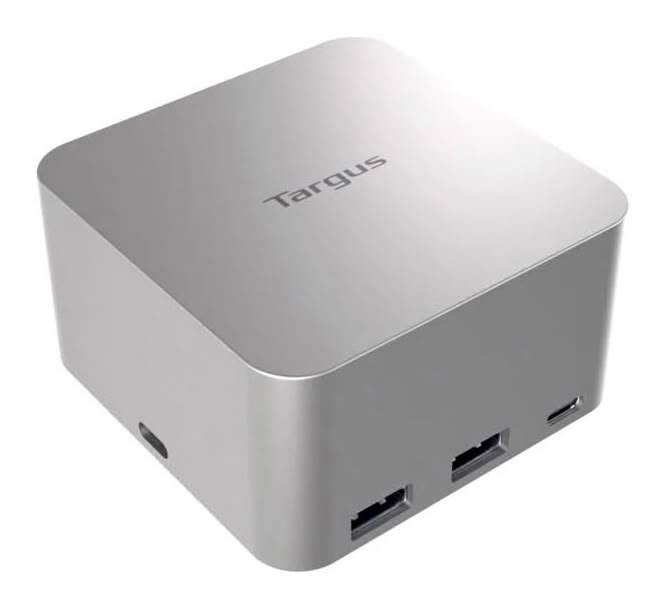
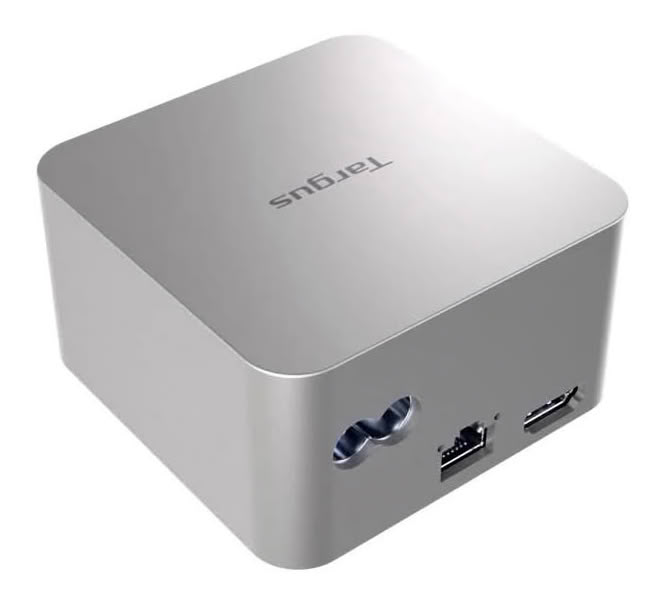
| External monitor | one HDMI port; single 8K, 30Hz display maximum | For 8K output, the host port, display chain and cable must support the required specifications. |
| USB connectivity | two USB 3.2 Gen 2 Type-A ports and one USB 3.2 Gen 2 Type-C port; each top data rate 10Gbps | Useful for storage, input devices and other common desk peripherals. |
| Wired network | one Gigabit Ethernet port | Provides a stable office or meeting-room connection when Wi-Fi is crowded. |
| Video standard | USB-C DisplayPort Alt Mode; no special driver needed | The laptop must support the video mode over USB-C. |
For consumers who need one monitor, the HDMI path is the most visible part of the spec. The wording “single 8K, 30Hz display” should be read carefully: it does not say the dock supports multiple high-resolution screens; it describes the ceiling for a single display. The DisplayPort Alt Mode requirement also means that not every USB-C laptop port behaves the same way. Some ports handle charging only, some handle data only, and some can also carry video. Buyers should verify their own laptop specifications before ordering.
Power Delivery: Where 140W and 100W Matter
Power is the second reason this dock differs from a standard accessory hub. It includes an internal GaN charger capable of delivering up to 140W USB PD 3.1 EPR to compatible devices. If the connected host supports USB PD 3.0, the maximum negotiated charging level is 100W. The 140W figure is the device's top capability, not a guarantee that every laptop will receive that amount at all times. Power is allocated dynamically when peripherals are attached.
Targus states that when the three downstream USB ports are all in use, the laptop can receive up to 100W. That makes the port count an important decision factor: a user who runs many external devices through the dock may not get the charger's headline maximum power. For buyers comparing this with a standalone charger plus a separate dock, this is a real trade-off rather than a hidden limitation. If the goal is to maximize charging power, check how many downstream ports will remain active. If the goal is a tidy desk with several accessories, the 100W ceiling under full peripheral load may still be enough, depending on the laptop.
Using DOCK402TT Without Wall Power
The dock can also run from host USB-C power when there is no wall outlet. In that mode it cannot charge the laptop, and the available functions depend on how much power the host can provide. This makes it suitable for temporary setups, but it should not be mistaken for a charging solution when wall power is missing.
Compatibility, Build and What Is Included
| Item | Details |
|---|---|
| Operating systems | Windows, macOS, iPadOS, Android, Chrome OS and Linux |
| Size | approximately 7.95×7.95×5.08 cm |
| Weight | about 0.37 kg |
| Included accessories | USB-C host connection cable and power cable |
| Materials | body uses up to 75% post-consumer recycled aluminum and plastic |
| Warranty | three-year limited warranty with a duration of three years |
Compatibility is broad on paper, but consumer expectations should still match device limitations. A phone or tablet may support USB-C, but that does not automatically mean it can drive an external display or negotiate the highest charging level. The dock is therefore best evaluated as a laptop-first accessory, while mobile devices can be considered secondary use cases. The compact body and included power cable matter for packing: 0.37 kg is not negligible in a laptop bag, but the integrated design replaces a separate charger and a separate dock.
Price, Availability and Purchase Timing
DOCK402TT is now on sale through the Targus official website and participating retailers, with an official price of 139.99 USD. To achieve 8K output or 140W charging, the host port, connected device and cable must still support the relevant specifications. That requirement makes the buying decision partly about existing equipment rather than the dock alone. If the laptop already supports video and USB-C power delivery, the dock may simplify the desk setup. If the laptop lacks USB-C DisplayPort Alt Mode support, a lower-cost display solution or a different workflow may be needed.
Common Myths and Pitfalls
- Myth: Any USB-C laptop port can use the 8K HDMI output. Fact: Video requires DisplayPort Alt Mode; the laptop must support the video mode.
- Myth: The laptop always gets 140W from the dock. Fact: 140W is the maximum capability; with three downstream USB ports active, laptop charging can be up to 100W.
- Myth: The dock can charge the laptop even when it is not plugged into wall power. Fact: Without wall power it runs from host USB-C and cannot charge the laptop; available functions depend on host power.
- Myth: 139.99 USD covers the whole chain. Fact: Full 8K output and full 140W charging also depend on supporting host port, cable and device specifications.
FAQ
Is the Targus DOCK402TT a dock or a charger?
It is both in one device: the product integrates USB-C docking functions with a GaN charger. For desk tasks, the docking side handles display, USB devices and Ethernet. For charging, the GaN side can provide USB PD 3.1 EPR power up to 140W to compatible devices.
What monitor output can I expect?
There is one HDMI port. The stated maximum is a single 8K, 30Hz display. Video passes through USB-C DisplayPort Alt Mode and does not require a special driver, but the host must support that video mode.
How many USB ports are available?
Two USB 3.2 Gen 2 Type-A ports and one USB 3.2 Gen 2 Type-C port are provided. All three are described with top data rates up to 10Gbps. They are also called three downstream USB ports in the power context.
Can I take it into a meeting room without a wall adapter?
Yes, the dock can operate from host USB-C power without wall power, but it cannot charge the laptop in that mode, and usable features depend on host power. A separate wall power connection is needed if charging is required.
Is it compatible with non-Windows devices?
Yes, the listed compatibility covers Windows, macOS, iPadOS, Android, Chrome OS and Linux. The experience still depends on the device's USB-C port functions.
Action Advice Before You Buy
For consumer buyers, the decision path can be simple. First, confirm the laptop USB-C port supports video output and the power-delivery mode you expect. Second, decide how many downstream USB devices you will plug in: if all three downstream USB ports will be active, plan around the stated 100W laptop charging maximum rather than the 140W headline. Third, check your monitor chain: the official price is 139.99 USD, but 8K output requires compatible port, display and cable support. Fourth, if your use is mostly travel or hybrid work, the integration of one USB-C cable, dock functions and GaN charging is the central benefit; if you rarely need wired Ethernet or a dock, a standalone charger may remain simpler. MyTechDailyNews recommends treating DOCK402TT as a desk and meeting accessory for compatible laptops, not as a universal upgrade for every USB-C device.
Conclusion
The Targus DOCK402TT's selling point is straightforward: fewer cables, fewer bricks, and one accessory that can cover display, network, peripheral and charging needs in a compatible setup. Its specifications are clear enough to match with real-world use: one HDMI port for a single 8K, 30Hz display maximum, two USB 3.2 Gen 2 Type-A ports, one USB 3.2 Gen 2 Type-C port, one Gigabit Ethernet port, and power up to 140W USB PD 3.1 EPR, with 100W relevant to USB PD 3.0 hosts and to full peripheral use. The compact build uses up to 75% post-consumer recycled aluminum and plastic, measures 7.95×7.95×5.08 cm, weighs about 0.37 kg, includes host and power cables, and comes with a three-year limited warranty lasting three years. Available through the Targus official website and participating retailers at 139.99 USD, it is best suited to buyers whose laptop already supports the required USB-C video and charging capabilities.