
MyTechDailyNews Consumer Electronics Guide: Dealing With Soldered Lenovo X1 Carbon RAM Faults
For consumers, the most annoying part of a thin-and-light laptop failure is not always the crash itself; it is the repairability question. In a recent Lenovo X1 Carbon case shared with MyTechDailyNews, the user normally kept 2 laptops separate: one personal machine and one work machine, with the work unit intended to stay in the office at the end of the day. The notebook had been reliable since the 2021 arrival story, but browser tabs began dropping, and the root filesystem occasionally marked itself as ReadOnly. That behavior can look like a browser or storage problem, yet the log evidence pointed toward memory faults and toward a category of failure that soldered RAM makes unusually awkward for ordinary owners.
The kernel log made the suspicion concrete: it showed checksum and filesystem errors under a BTRFS root on a Luks-mapped device.
Oct 15 23:33:35 razor-crest kernel: BTRFS warning (device dm-0): csum failed root 257 ino 166754 off 5859786752 csum 0x31019647 expected csum 0x6d009929 mirror 1
Oct 15 23:33:35 razor-crest kernel: BTRFS error (device dm-0): bdev /dev/mapper/luks-571c7357-a343-49f3-993c-167c8c5dcec6 errs: wr 0, rd 0, flush 0, corrupt 3856936704, gen 0
A consumer-first view: what the failure looks like before it becomes a repair decision
From a consumer electronics perspective, this is a pattern worth recognizing: the symptoms are application crashes and read-only filesystem warnings, but the next test should look at RAM before reinstalling everything. The owner added a Memtest86+ boot image to a Ventoy USB stick and booted from it. That moves the diagnosis outside the normal desktop environment, where running tasks can hide intermittent problems.
How Memtest86+ turns vague crashes into a usable clue
Memtest86+ boots a minimal environment, writes patterns to every physical memory address it can reach, then reads them back. If a value changes between write and read, the tester gets a concrete signal that the memory region is unreliable. For a buyer or repair-minded user, the important result is simple: the problem can be localized as memory-related, not merely a browser issue.
Leaving the tool running for multiple passes is also useful because some faults are intermittent. In the Lenovo X1 Carbon case, many errors appeared almost immediately, which made the soldered-memory repair problem unavoidable.
Why soldered RAM changes the consumer repair route
Older laptops gave owners a clearer path: the test could narrow down the faulty DIMM, or the user could remove one DIMM and rerun the test as a binary search. Once the suspect module was known, a replacement DIMM could be ordered, or the opportunity could be taken to upgrade capacity. That path disappeared for many modern designs because manufacturers chase thinner profiles. A DIMM socket adds ~6mm of depth, and RAM is now soldered directly to the motherboard of most laptops.
FrameWork is the exception named in the case, and unless someone is skilled at replacing ball grid chips, replacement is not realistically an option. That is the practical consequence for buyers: a memory fault is often not a simple part swap once the machine has shipped with soldered memory.
The decision point: keep using it, map bad memory, or replace the machine
Depreciation over 5 years and advances mean it is probably time to find a new laptop. The personal machine in this scenario was an older Dell XPS 13, and the owner considered letting the Lenovo X1 Carbon take its place after stabilizing it. The first practical question was whether the notebook could remain usable while waiting for a replacement. That led to 2 options that could be passed to the Linux kernel to avoid bad sectors: badram and memmap.
badram turned out to be an out-of-tree patch usually shipped only in Debian/Ubuntu based distros. This machine runs Fedora, so that path was not going to work. memmap is a core kernel feature, so it should be available on Fedora. It needs a list of memory addresses and lengths in the format length$offset on the kernel command line.
Transcribing the test result: the tedious workaround step
Memtest86+ can output the correct format for both badram and memmap, and can save it to a file, but the owner could not get it to work with the iso image placed on the Ventoy USB stick. The fallback was taking a photo of the screen.
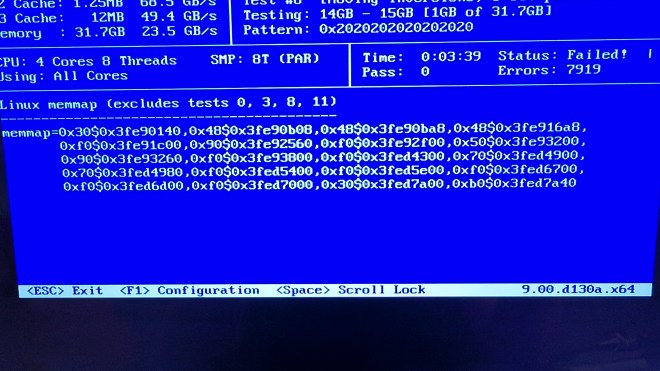
The photo then had to be transcribed manually, which was fun.
GRUB changes that failed at first
Standard guidance for adding kernel command line arguments says to edit /etc/default/grub, add the values to GRUB_CMDLINE_LINUX, then run grub2-mkconfig -o /boot/grub2/grub.cfg. The first attempt placed the memmap value directly in the command line string.
GRUB_TIMEOUT=5
GRUB_DISTRIBUTOR="$(sed 's, release .*$,,g' /etc/system-release)"
GRUB_DEFAULT=saved
GRUB_DISABLE_SUBMENU=true
GRUB_TERMINAL_OUTPUT="console"
GRUB_CMDLINE_LINUX="rd.luks.uuid=luks-571c7357-a343-49f3-993c-167c8c5dcec6 rhgb quiet memmap=0x30$0x3fe90140,0x48$0x3fe90b08,0x48$0x3fe90ba8,0x48$0x3fe916a8,0xf0$0x3fe91c00,0x90$0x3fe92560,0xf0$0x3fe92f00,0x50$0x3fe93200,0x90$0x3fe93260,0xf0$0x3fe93800,0xf0$0x3fed4300,0x70$0x3fed4900,0x70$0x3fed4980,0xf0$0x3fed5400,0xf0$0x3fed5e00,0xf0$0x3fed6700,0xf0$0x3fed6d00,0xf0$0x3fed7000,0x30$0x3fed7a00,0xb0$0x3fed7a40"
GRUB_DISABLE_RECOVERY="true"
GRUB_ENABLE_BLSCFG=true
That edit made the machine fail to boot. The GRUB screen showed a kernel command line in which the $0 portion of the memmap entry had been replaced. This looks like classic environment variable substitution, since $0 is usually the name of the script being run. A RedHat bug described a similar problem and pointed to the fix: add the value as a variable.
# grub2-editenv /boot/grub2/grubenv set memmap_val='0x30$0x3fe90140,0x48$0x3fe90b08,0x48$0x3fe90ba8,0x48$0x3fe916a8,0xf0$0x3fe91c00,0x90$0x3fe92560,0xf0$0x3fe92f00,0x50$0x3fe93200,0x90$0x3fe93260,0xf0$0x3fe93800,0xf0$0x3fed4300,0x70$0x3fed4900,0x70$0x3fed4980,0xf0$0x3fed5400,0xf0$0x3fed5e00,0xf0$0x3fed6700,0xf0$0x3fed6d00,0xf0$0x3fed7000,0x30$0x3fed7a00,0xb0$0x3fed7a40'
After that, /etc/default/grub was changed so the long value was referenced through the variable:
GRUB_TIMEOUT=5
GRUB_DISTRIBUTOR="$(sed 's, release .*$,,g' /etc/system-release)"
GRUB_DEFAULT=saved
GRUB_DISABLE_SUBMENU=true
GRUB_TERMINAL_OUTPUT="console"
GRUB_CMDLINE_LINUX="rd.luks.uuid=luks-571c7357-a343-49f3-993c-167c8c5dcec6 rhgb quiet memmap=$memmap_val"
GRUB_DISABLE_RECOVERY="true"
GRUB_ENABLE_BLSCFG=true
Running grub2-mkconfig -o /boot/grub2/grub.cfg again produced a working boot path. The correct expanded values could then be seen in /proc/cmdline, including the Fedora kernel line 7.2.11-200.fc44.x86_64.
BOOT_IMAGE=(hd0,gpt2)/vmlinuz-7.2.11-200.fc44.x86_64 root=UUID=869b183b-b858-40e5-8da7-e923dd367c2a ro rootflags=subvol=root rd.luks.uuid=luks-571c7357-a343-49f3-993c-167c8c5dcec6 rhgb quiet memmap=$memmap_val
A text file containing the memmap values was kept on a USB stick so the workaround could be re-applied if the machine needed a full reinstall. The next tasks were to back up everything needed, then run btrfs check --fix to see whether filesystem metadata could be cleaned.
Decision table: how to think about soldered-memory faults
| Route | What it involves | When it fits | Limits to understand |
|---|---|---|---|
| Replace a DIMM | Identify the faulty module and swap it | Older laptops with socketed memory | Not available on a soldered design like this Lenovo X1 Carbon |
| Keep the laptop, skip bad sectors | Run Memtest86+, record the bad ranges, pass memmap to the kernel | Temporary use while waiting for a replacement | Requires careful transcription and can be blocked by bootloader string handling |
| Buy a new laptop | Replace the machine after a 5 years depreciation cycle and technology advances | Stability matters more than extending life | The failure itself does not create a simple repair option if RAM is soldered |
FAQ: buying and repair questions a similar crash raises
- Question: Does soldered RAM mean the laptop is immediately useless? Answer: Not always. Linux memmap can tell the kernel to avoid known bad memory regions, as this case showed. It is a stability workaround, not a repair of the soldered part.
- Question: Should a user start by reinstalling the OS? Answer: The article argues against that when the evidence points to RAM. It used Memtest86+ first, because the tool can show whether memory addresses return bad values.
- Question: Can badram be used on any Linux system? Answer: No. badram is described as an out-of-tree patch usually shipped only in Debian/Ubuntu based distros; this Fedora machine used memmap instead.
- Question: Why did the first GRUB attempt fail? Answer: The memmap string contains $ characters, and the first GRUB entry was altered as if it were an environment variable reference. The workaround was to store the value in grubenv and reference it with $memmap_val.
- Question: What should a cautious owner do before the workaround? Answer: The case emphasized backing up everything needed, and keeping the memmap values on a USB stick in case a reinstall becomes necessary.
Common misconceptions to avoid
- Thin laptops are always repairable because the parts are standard. This case shows why that assumption can fail: a DIMM socket adds ~6mm of depth, so soldered memory can remove the usual replacement step.
- If a memory tester finds errors, the only answer is a new machine immediately. The workaround showed that a user could keep the Lenovo X1 Carbon running by mapping bad sectors, although replacing the laptop remained the longer-term path.
- A kernel option is just a copy-and-paste task. Here the memmap values had to be transcribed from a photo, then handled carefully through GRUB.
- FrameWork-style designs are the rule. They are the exception, not the default, in the laptops described by the case.
Action advice for consumers facing the same symptoms
- Record the evidence first. Save timestamps and error strings, including Oct 15 23:33:35 and the BTRFS lines, before guessing.
- Test outside the normal desktop. A Ventoy USB with Memtest86+ lets the tester write and read memory patterns directly.
- Check the repair route before the crash. If the design has soldered RAM, expect that module replacement may not be practical.
- Treat memmap as a bridge, not a cure. It can avoid bad sectors while waiting for a replacement, but the owner still planned to make sure everything was backed up.
- Write down the exact kernel arguments. The values, including 0x30$0x3fe90140 through 0xb0$0x3fed7a40, were saved on a USB stick for re-application.
For buyers, the real lesson from this Lenovo X1 Carbon incident is that repairability should be evaluated as part of the product experience, not as a bonus feature. A memory fault can be diagnosed with a bootable tester, and a Linux kernel option can buy time, but soldered RAM turns a simple part replacement into a workaround-and-replace decision. If a shop or household keeps a machine for more than a short refresh cycle, the design that allows modules, ports, or documented repair paths is more consumer-friendly than a design that assumes failure means a new purchase.