
Razer Hammerhead V3 Chroma Review: Is This USB-C Wired Gaming Earbud Worth Buying?
If you play mobile or handheld games on devices with a USB-C port, dislike Bluetooth lag, battery drain, or codec compression, the Razer Hammerhead V3 Chroma is a practical wired option. Its 79.99 USD price in the United States, global-market availability, four sound presets, and THX 7.1 surround sound make it a focused buy for gamers who value low-latency audio more than complete wireless freedom.
By Sarah Chen, MyTechDailyNews Consumer Electronics. For Tech Daily product-tip questions, email hello@techdaily.com.
Why are wired USB-C earbuds returning now?
Wired audio is coming back because the device landscape has changed more than the earbud concept. Bose has helped revive interest in wired listening, and Razer now joins the trend with the Hammerhead V3 Chroma. Instead of relying on a traditional 3.5 mm jack, it uses USB-C, which matches current phones, handhelds, tablets, and PCs.

For shoppers, the value is less about nostalgia and more about reliability: a direct wired path can sidestep Bluetooth latency, battery drain, and codec compression. The trade-off is obvious, though. The cable still limits movement, can snag, and asks you to treat the connector more carefully than a wireless case.
What does the 90-degree USB-C plug improve for real use?
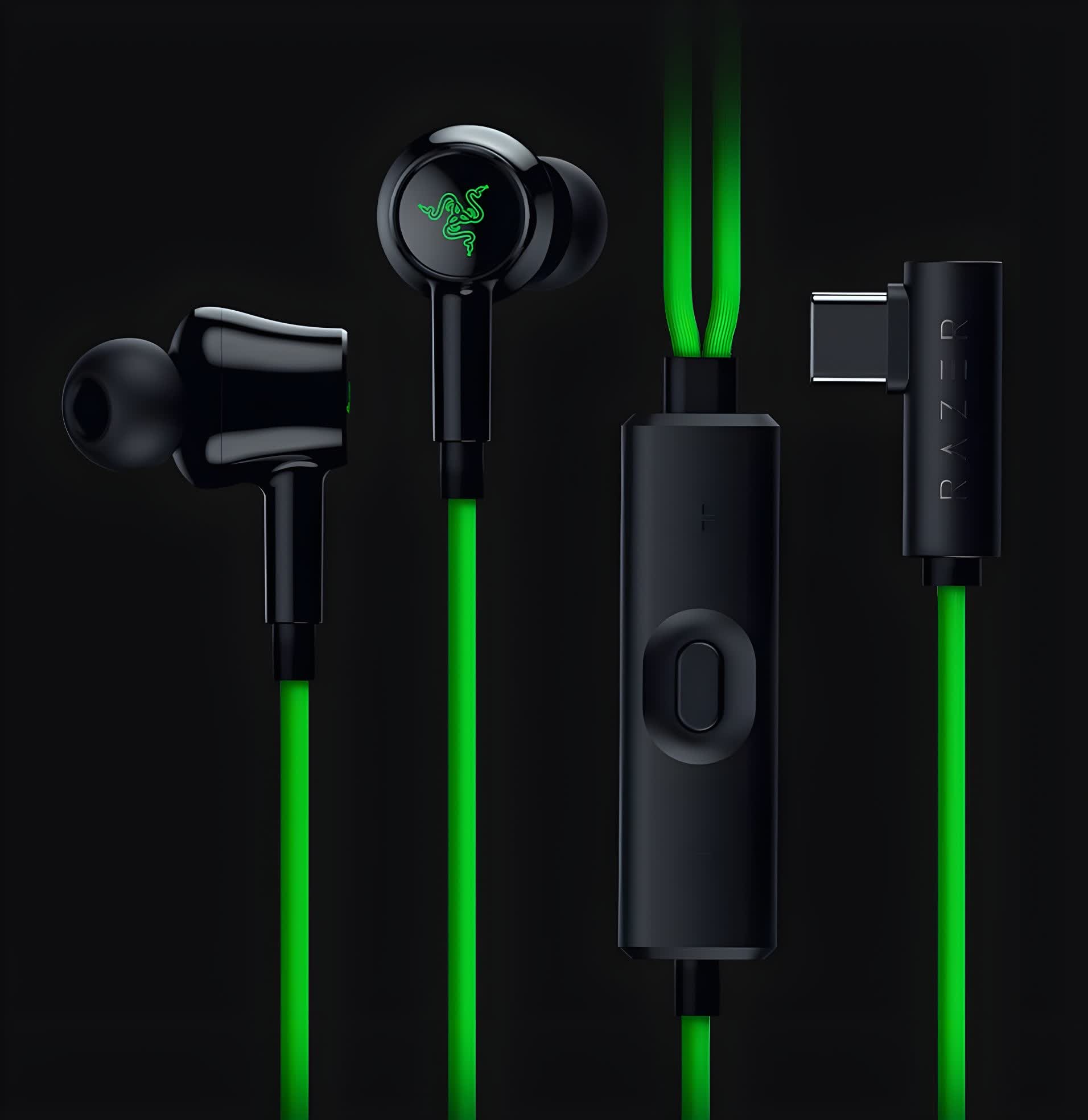
The 90-degree bent USB-C plug is the most practical ergonomic detail here. In landscape gaming, a straight connector can dig into the palm, push the cable away from the phone edge, or create awkward tension. Razer's angled design routes the wire closer to the device, helping the phone feel steadier in hand. It is not an audio enhancement; it is a comfort fix.
Still, it does not erase the fundamental problem of wired products. If you move a lot, keep the cable outside your sleeve, and do not yank it around controllers or door frames.
Do the drivers and presets make everyday listening easier?
The sound architecture uses an 11 mm dynamic driver for bass weight and a separate high-frequency unit for detail. The goal is to keep explosions, footsteps, vocals, and effects from collapsing into a muddy mix. In daily use, that matters when you switch from a shooter to a movie or a voice chat and do not want to rebuild an equalizer every time.
- Game preset: better cues and action impact.
- Music preset: more balanced tonality.
- Movie preset: clearer dialogue.
- Call preset: voice-first tuning.
These four sound presets are not a gimmick; they are a shortcut. If you are the kind of buyer who changes audio modes between work calls, commute music, and evening games, the preset switch is a useful practical feature. Custom equalizer control gives more room, but you do not need to use it on day one.
Is the ANC helpful for commuting and casual gaming?
The ANC is helpful when the noise is steady and predictable. Bus engines, café fans, train hum, and shared-room chatter are the best cases for feed-forward active noise cancellation. The in-line remote lets you change ANC or playback without touching the phone, which is convenient when you are holding the device horizontally.
Do not expect premium over-ear cancellation at this price. The seal of the ear tips matters as much as the ANC algorithm. If the ear tips leak air, bass and noise reduction both suffer, no matter how strong the mode is.
What do RGB lighting and software features add?
The earbuds include Razer Chroma lighting with about 16.8 million colors, and lighting can sync with Razer devices or supported games. This is purely aesthetic. It does not make the sound more detailed or the connection lower latency.
The more meaningful software feature is PC-side surround. Razer's official product listing says it aims to "deliver immersive surround sound with ANC, and stay comfortable with an ergonomic, water-resistant design." THX 7.1 surround sound becomes available through Razer Synapse 4 on a PC. If your main rig is mobile, you get the wired stereo benefit and presets. If your main use case is PC gaming, the surround layer is a reason to consider it. As of November 2026, the official listing also highlights comfort and a water-resistant design, which maps to its IPX4 splash resistance.
Can you use it for calls, exercise, and light weather?
Yes, with limits. The built-in full-directional microphone is designed for game chat, ordinary calls, and in-line volume control. IPX4 splash resistance makes sweat and light rain acceptable, but it is not waterproof. Do not submerge the earbuds, run them under a faucet, or rely on them in a storm. After gym use, wipe the cable and connector dry.
Quick table: should you buy or skip the Hammerhead V3 Chroma?
| Buyer profile | Verdict | Why |
|---|---|---|
| USB-C phone gamer | Buy candidate | Direct wired path avoids Bluetooth latency and battery anxiety. |
| Travel commuter | Maybe | ANC helps with steady noise, but it is not premium cancellation. |
| Wireless-first user | Skip | The cable still limits movement and may snag on clothing. |
| PC desktop gamer | Compare | THX 7.1 surround sound is useful, but headsets may give more soundstage. |
| Casual fitness listener | Buy with care | IPX4 supports sweat, but heavy rain and submersion are out. |
Common buyer mistakes to avoid
- Assuming every USB-C port can output audio. Android platform documentation says analog-only adapters are not supported; digital-to-analog adapters with proper conversion are required, so no-name dongles can fail.
- Thinking RGB equals better sound. It does not. Lighting is visual customization only.
- Ignoring ear-tip fit. ANC, bass response, and mic leakage depend heavily on seal.
- Expecting mobile THX 7.1 surround sound. The THX path is enabled through Razer Synapse 4 on PC.
- Treating IPX4 as waterproof. It is splash resistance only.
- Buying the cable as a permanent travel solution. Cables need routing care and connector inspection.
Action checklist: set it up and test it in 10 minutes
- Check that your phone, tablet, or handheld actually accepts USB-C audio output.
- If using an adapter, pick a branded digital USB-C audio adapter, not the cheapest passive plug.
- Plug the 90-degree connector first, then route the cable around the back of the phone for landscape play.
- Start with the Game preset and test one fast-paced title; switch to Call or Music before judging tonal balance.
- Install Razer Synapse 4 on PC if you want Chroma customization, EQ tweaks, and THX 7.1 surround sound.
- Test the inline mic by recording a short voice note before relying on it for team chat.
- Store the cable loosely and keep the connector dry after workouts.
FAQ: what consumers ask before checking out
Is the Hammerhead V3 Chroma better than Bluetooth earbuds?
It is better for wired consistency: no pairing, no battery, no Bluetooth compression, and less chance of lag. It is worse for mobility, because the cable stays attached to your device.
Does it still make sense without a 3.5 mm jack?
Yes. USB-C has become the practical replacement on many phones and PCs, but you still need to confirm your device's port supports audio output or use a proper digital adapter.
Is the microphone detachable?
No. The microphone is integrated into the inline cable setup, which is good for reliability and quick game chat, but it cannot be replaced like a boom mic.
Can it block loud office noise?
It can reduce steady background noise with ANC, but sudden voices, keyboard clatter, and high-frequency office chaos will still leak through unless the fit is very good.
Is 79.99 USD a fair price for this feature set?
At 79.99 USD, it is fair for buyers who specifically need USB-C, wired latency control, ANC, and RGB. It is not the best value if you already own excellent Bluetooth earbuds or only want casual music listening.