
MyTechDailyNews ConsumerElectronics Checklist: Is the ASUS ProArt P16 Worth It Over the P14?
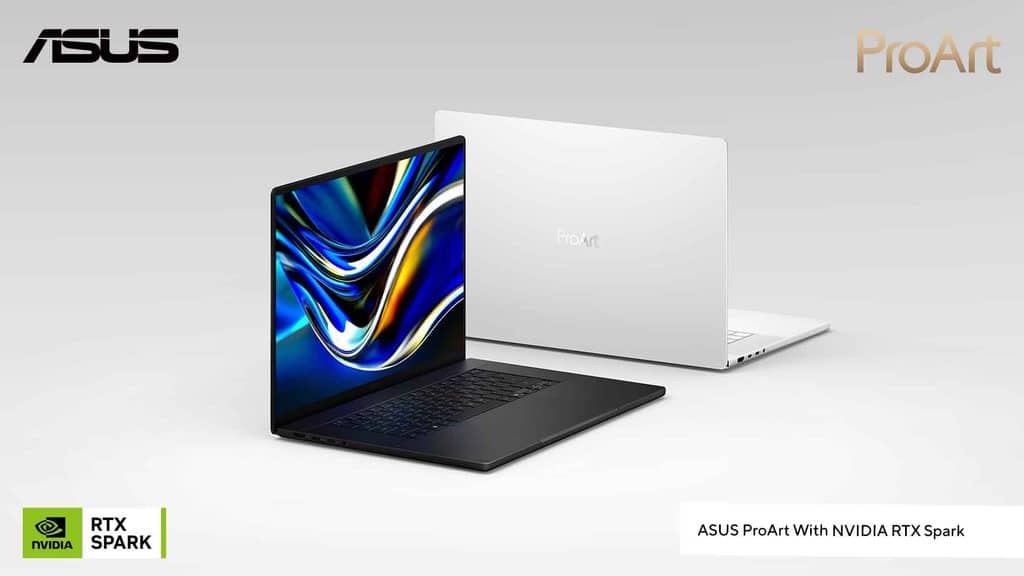
If your work already includes generative AI, editing, 3D or local model experiments, my answer in India is simple: shortlist ProArt P16 (H7607BA) first when the 16-inch 4K canvas, 99.9Wh battery and up to 128GB unified memory matter; choose ProArt P14 (H7407BA) when commute weight and the lower ₹3,29,990 entry price matter more. Both are creator tools, not casual laptop upgrades.
What the new ASUS ProArt line actually changes
ASUS has brought a creator-laptop story to India that starts with platform fit rather than raw specs. The ProArt P16 and ProArt P14 are built around the NVIDIA RTX Spark N1X computing platform, and ASUS says the systems can run more than 1,000 AI-accelerated applications, naming Adobe, Blender and ComfyUI. That wording matters: it tells you the hardware is meant for local AI-assisted creative work, not for people who only need a faster spreadsheet machine.
ProArt P16: the larger canvas and longer runtime
On paper, ProArt P16 is the workstation-leaning option. It combines NVIDIA RTX Spark N1X architecture with a 20-core central processing unit (CPU), a 6,144-core graphics processing unit (GPU), and up to 128GB unified memory. The 16-inch 4K ASUS Lumina Pro OLED touchscreen is paired with 120Hz refresh rate and Pantone color validation, then wrapped in an approximate 1.77kg body. The 99.9Wh battery is the number I would trust most for travel days where wall access is inconvenient.
ProArt P14: the lighter creator option, with trade-offs
ProArt P14 keeps the same family of local AI tools, but the spec split is more compact. It uses an 18-core processor plus a 5,120-core graphics card, with a 14-inch 3K ASUS Lumina Pro OLED touchscreen, 120Hz refresh rate and Pantone validation. It weighs approximately 1.48 kg and carries a 90Wh battery. If you carry a bag daily, the 0.29 kg difference may be more meaningful than the smaller GPU core count.
Features that shape the daily experience
Both models include ASUS HapticPad controls, HapticPad precision touch behavior and ProArt Creator Hub software. In use, those tools are most useful when they save repeated clicks during editing, color work, workflow switching or AI prompt management. The lineup also includes 4K and 3K OLED touchscreen display options, so your choice is partly about screen format, not only about performance. The platform itself supports up to 6,144 GPU cores, which is the hardware reason these machines are aimed at image generation, 3D design, content editing and local AI model experiments.
How to choose between P16 and P14
Use this short decision path:
- Buy ProArt P16 if: you use Adobe, Blender or ComfyUI in long sessions, need more headroom for 128GB memory configurations, or prefer the 16-inch 4K canvas.
- Buy ProArt P14 if: you move between office, cafés and client sites, value approximately 1.48 kg over the larger runtime, and can live with the 18-core processor and 5,120-core graphics card.
- Wait first if: your work is mostly cloud-hosted, your apps have not been tested on NVIDIA RTX Spark N1X, or your budget depends on the base price rather than the exact configuration.
Price check and purchase checklist
The core Indian price anchors are clear: ProArt P16 starts from ₹4,99,990, while ProArt P14 starts from ₹3,29,990. The ecosystem items are ProArt Mouse MD301 at ₹8,499 and ProArt Keyboard KD300 at ₹14,999. For the mouse, ASUS lists an 8,000 DPI sensor, a glass tracking system and six programmable buttons; for the keyboard, it lists a small 65% layout and low-profile optical switches with a touchpanel.
Do not stop at the starting price. Gizmochina reports that, in India, the ProArt P16 with 128GB memory and a 1TB SSD was listed at ₹6,49,990, above the ₹4,99,990 base figure, while the ₹3,29,990 ProArt P14 reference was a 24GB/1TB configuration. That makes the SKU check non-optional: confirm CPU label, memory capacity, storage size, color, warranty scope and retail channel before you pay.
Launch timing and offers worth checking
Gizmochina also states that both laptops went on sale in India starting November 3, 2026, through ASUS Exclusive Stores, Croma, Reliance Digital, Flipkart, Amazon and the ASUS eShop. It lists launch offers such as no-cost EMI starting at ₹13,750 per month, a two-year warranty extension, and three years of damage protection for ₹99, valued at ₹6,599, valid until November 30, 2026. Because offers change, verify these terms at checkout.
Common mistakes to avoid
- Assuming "more than 1,000 AI-accelerated applications" means every workflow runs faster. Application support is not the same as measured optimization in your project.
- Choosing OLED touch without considering how you work. The screen is a genuine strength, but if you rarely need direct touch, you should judge it like any other creator laptop; if you are skeptical about touch-first premium laptops, we covered that awkwardness in Is the Touch Screen MacBook Pro Worth the Extra Money?
- Buying the keyboard and mouse before the laptop. ProArt Keyboard KD300's small 65% layout suits travel, but it is not a replacement for confirming the laptop's actual port layout and battery behaviour.
Comparison table: what changes in real use
| Decision factor | ProArt P16 | ProArt P14 |
|---|---|---|
| Screen | 16-inch 4K ASUS Lumina Pro OLED touchscreen | 14-inch 3K ASUS Lumina Pro OLED touchscreen |
| Compute anchor | 20-core central processing unit (CPU) and 6,144-core graphics processing unit (GPU) | 18-core processor and 5,120-core graphics card |
| Memory | up to 128GB unified memory | check listed configuration; the 24GB/1TB tier is the reported starting variant |
| Battery and weight | 99.9Wh battery; approximate 1.77kg | 90Wh battery; approximately 1.48 kg |
| Best use | long editing, rendering, ComfyUI experiments, Pantone-sensitive previews | commute-heavy work, lighter client meetings, shorter mobile sessions |
FAQ: what buyers ask before choosing
Which should a first-time local-AI creator choose?
Choose ProArt P16 if you want the safer performance and memory ceiling for 3D, image generation and multi-application editing. Choose ProArt P14 if the purchase is driven by portability and you can accept the smaller screen and lower GPU core count.
Is the ProArt P14 too weak for local AI work?
No, not by the platform definition alone. It still sits inside the NVIDIA RTX Spark N1X family and supports more than 1,000 AI-accelerated applications. The real question is whether your project needs the larger memory headroom and longer runtime of the P16.
Do the ProArt Mouse MD301 and ProArt Keyboard KD300 matter?
They matter only after the laptop choice is settled. The MD301 is useful for precise pointer work with its 8,000 DPI sensor and six programmable buttons, while the KD300 suits tighter desks with its small 65% layout. Neither should replace testing the laptop itself.
Should I wait for discounts?
If you can buy before the reported offer window ends, the financing and protection terms can matter. If the retail price is above your threshold, waiting is reasonable, because creator laptops are often discounted through festival or channel events.
My buying advice
For most serious creator buyers in India, I would place ProArt P16 at the top of the test list, then buy ProArt P14 only after trying a day of real work on it. If the ₹4,99,990 base P16 configuration does not include the memory and storage tier you need, treat ₹6,49,990 or another retailer price as the practical comparison. ASUS India's ProArt with NVIDIA RTX Spark page is worth checking beside any listing, because it frames the product around creators and AI developers rather than generic office use.