
Consumer Electronics Guide: Apple's iPhone Duo Hinge and Screen Cleaning Advice | MyTechDailyNews
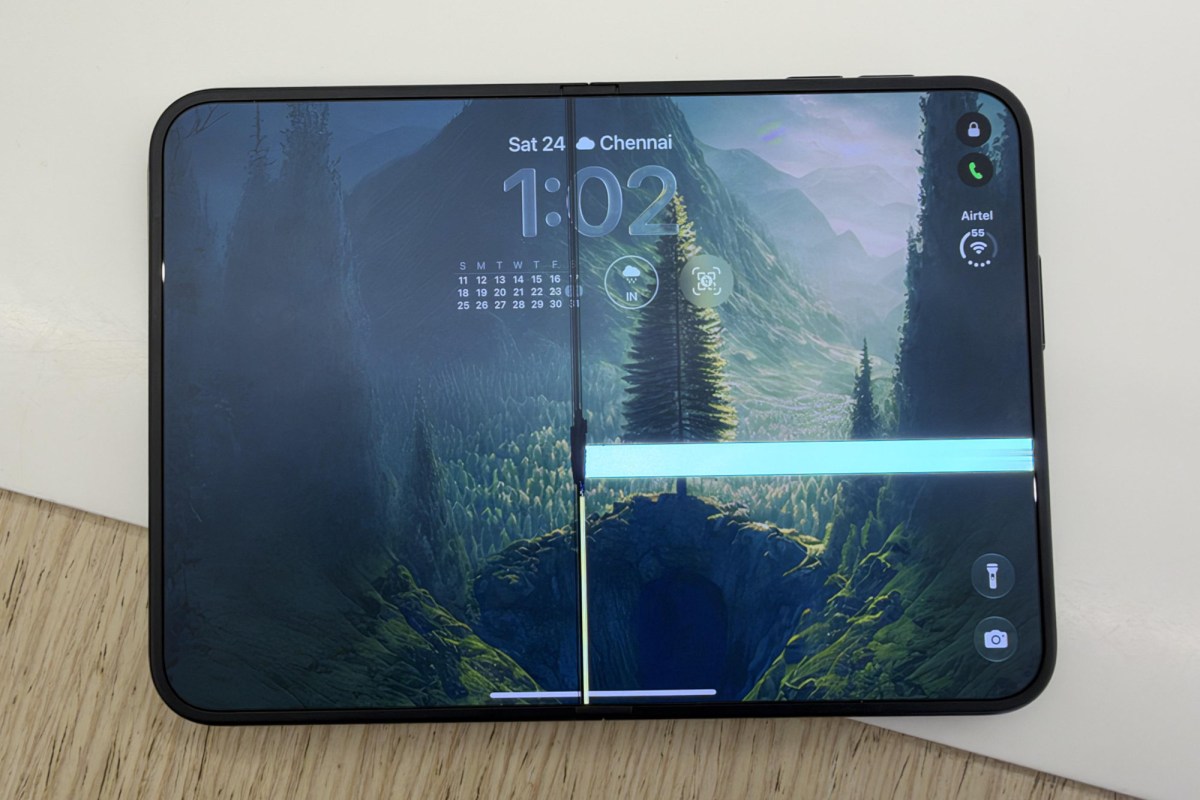
When a folding phone begins to feel awkward during opening, closing, or resting at an angle, many users want to know whether the issue is a simple inspection task or a deeper hardware condition. Apple's published guide for iPhone Duo gives a focused answer: watch for specific hinge and closing behaviors, remove accessories before checking, look for dirt or dust, clean the screen carefully, and understand that software cannot fix the hardware symptoms it describes.
What the guide asks iPhone Duo owners to notice
Apple describes the symptoms as physical signs rather than variations to ignore. The guide points to a phone that cannot fully open or fully close, unusual sound while folding, and looseness in the hinge area. For a consumer, the important part is the sequence: these are signs that should lead to a check, not a guess. The guidance does not turn every hinge complaint into a repair conclusion, but it does make clear when an owner should pay closer attention.
Start with the accessory check, not a repair decision
Before treating a hinge feeling as a failed part, Apple's suggested first steps are removal and inspection. The guide says to remove the protective case or screen protector. This matters because external items can obscure whether the device can behave as intended. Once those items are removed, the user should check whether iPhone Duo can remain stable at different angles and should look for dirt or dust caught in the hinge region. This is the practical decision-support step: a quick, reversible check that separates accessory interference from a physical symptom that persists.
- Remove the protective case.
- Remove the screen protector if one is installed.
- Check whether the hinge can hold the phone at different angles.
- Look for dirt or dust that may be stuck around the hinge.
Clean the screen safely: the guide's dos and don'ts
Screen cleaning is part of the same guidance, but its boundaries are clear. The guide specifies a soft cloth that is slightly damp and does not shed lint. It also places conditions before cleaning: all cables should be unplugged and the phone should be powered off. On the chemical side, Apple says not to use products that contain bleach or hydrogen peroxide, and not to immerse iPhone in any cleaning agent. For consumers, this is the clearest line in the guidance: gentle damp-cloth care is described, while liquid soaking and bleach or peroxide products are excluded.
- Unplug all cables from the device.
- Power off the phone before cleaning the screen.
- Use a soft cloth.
- Make the cloth only slightly damp.
- Use a lint-free cloth.
- Do not use cleaners containing bleach.
- Do not use cleaners containing hydrogen peroxide.
- Do not immerse the iPhone in any cleaning agent.
Why this guidance may lead to component replacement
One line in the guide sets a firm boundary: these are hardware issues, and software cannot fix them. That point is useful for readers who might expect digital troubleshooting to correct a hinge that does not feel right. The guide's escalation path is physical: after removing accessories and checking for debris, if the issue remains unresolved, the internal display component needs replacement. This gives the consumer a clear stopping point. The guidance does not recommend repeated cleaning as a cure for mechanical looseness or abnormal movement.
Comparison table: what the guide says versus shortcuts to avoid
| Symptom or task | Guided action | Shortcut the guide rules out |
|---|---|---|
| Cannot fully open or close | Remove case or protector, check different-angle stability, inspect for debris | Expect a software fix |
| Folding makes abnormal sound | Check for dirt or dust around the hinge | Treat it as unrelated to hardware condition |
| Hinge feels loose | Follow the guide's hardware check and escalation | Assume settings will correct looseness |
| Screen cleaning | Unplug cables, power off, use a soft slightly damp lint-free cloth | Use bleach or hydrogen peroxide cleaners |
| Debris inspection | Look for dirt or dust caught in the hinge area | Immerse iPhone in any cleaning agent |
Action checklist for MyTechDailyNews readers
Use this checklist when iPhone Duo shows a new open, close, fold, or hinge feeling. It keeps the consumer's next steps within the guide's stated boundaries.
- Note whether the phone fully opens and fully closes.
- Note whether folding produces abnormal sound.
- Note whether the hinge feels loose.
- Remove the protective case and screen protector.
- Check whether iPhone Duo can remain stable at different angles.
- Inspect for dirt or dust in the hinge region.
- Before cleaning the screen, unplug all cables and power off the phone.
- Clean with a soft, slightly damp, lint-free cloth only.
- Avoid bleach-based and hydrogen-peroxide-based cleaning products.
- Avoid immersing the iPhone in any cleaner.
- If symptoms remain after following the guidance, recognize replacement of the internal display component as the stated outcome.
Common misconceptions corrected by the guide
- Misconception: A hinge problem should respond to software because the phone also has software. Guide position: The guide describes these as hardware issues that cannot be repaired through software.
- Misconception: Cleaning can repair hardware symptoms if the device is wiped long enough. Guide position: Cleaning and accessory removal are checks; if the problem remains unresolved, replacement of the internal display component is the stated next step.
- Misconception: Cleaning products containing harsh chemicals are acceptable when applied lightly. Guide position: Products containing bleach or hydrogen peroxide are excluded.
- Misconception: Soaking or immersing can help remove dust from tight spots. Guide position: iPhone must not be immersed in any cleaning agent.
- Misconception: A case or protector can stay on during a precise hinge check. Guide position: Apple says to remove the protective case or screen protector before checking hover and debris.
FAQ: quick consumer answers
Q: Which iPhone model is covered by the hinge and cleaning guidance described here?
A: The guide is for iPhone Duo.
Q: What physical symptoms should I watch for?
A: Inability to fully open or close, abnormal sound when folding, and hinge looseness.
Q: Should I remove accessories before checking?
A: Yes. The guide says to take off the protective case or screen protector.
Q: What should I check after removing accessories?
A: Check whether the phone can remain stable at different angles and whether dirt or dust is stuck around the hinge.
Q: What screen-cleaning tool is recommended?
A: A soft, slightly damp, lint-free cloth.
Q: What preparation is required before screen cleaning?
A: Unplug all cables and power off the phone.
Q: Which cleaners are prohibited?
A: Do not use cleaners containing bleach or hydrogen peroxide, and do not immerse iPhone in any cleaning agent.
Q: What happens if the problem remains unresolved?
A: The guide states that the internal display component needs replacement.
Bottom line
For MyTechDailyNews readers, the value of Apple's iPhone Duo guidance is its simplicity: watch for the named hinge symptoms, remove accessories, inspect for debris, clean the screen only with approved care, and accept the hardware boundary. The guide does not leave users guessing between software fixes and mechanical replacement; it points to a sequence of checks and then to internal display component replacement if those checks do not resolve the condition.